Available for freelance projects, contract work, and full-time roles

Turn operational drag into software you can trust.

I build practical Python automation, browser tools, and internal software for the repetitive work that falls between your existing systems.

Every project here is working software I can demonstrate — built so the person responsible can review and control what it does.

How one of my tools handles a cleanup run

synthetic data

A real demo run from CRM Rescue, one of the projects below:

  1. Import24 rows arrive from three messy sample CSV exports
  2. ValidateBroken and incomplete rows stay visible instead of vanishing
  3. Flag6 possible duplicates are queued for a person to review
  4. Decide2 merged, 4 kept separate — each one an explicit approval
  5. Export22 clean records leave with a full audit trail

No silent changes — every merge was someone's explicit decision.

  • Python
  • Browser automation
  • Data pipelines
  • Internal tools
  • Practical AI
  • Human approval

Selected work

Three tools, three everyday operations problems.

These are functioning projects, not concepts. Each case study walks through the problem, who it helps, how the workflow runs, and what I tested.

01 · Python data pipeline

Public bid research, without the tab chaos.

Public construction opportunities are scattered across agency pages and portals with inconsistent titles, deadlines, and access rules.

TradeOps collects those pages into one reviewable report: every record keeps its source, duplicates are collapsed, and anything with unclear usage rights is held back for review instead of published.

From the demo: In the offline demo, five synthetic records become four unique opportunities — one duplicate collapsed, one source held for rights review.

Read the TradeOps Data case study
TradeOps demo — 5 sample recordssynthetic data
INPUT05 records
TX-4401city portal
TX-4402county feed
TX-4402duplicate
TX-4403rights hold
TX-4404district page
01DEDUPE
02RIGHTS
03NORMALIZE
OUTPUT04 unique
4reviewable records

03released

01quarantined
02 · Chrome extension

Job application help that never touches Submit.

Repetitive job applications invite copy-paste errors, and most autofill tools grab the wrong page or push into fields that should stay personal.

ATS Copilot reads the job page you choose, compares its keywords against your resume, drafts editable text, and fills only recognized safe fields. Salary, visa, and demographic questions stay manual, and submitting is always your click.

From the demo: In the verified browser flow, the extension kept the intended tab even after a decoy tab took focus, filled three safe fields, left three sensitive fields empty, and submitted nothing.

Read the ATS Copilot case study
jobs.example.test/applysynthetic fixture
Application4 fields detected

03 · Local-first internal tool

Messy CRM exports, cleaned up in the open.

CRM exports fill up with duplicates, missing owners, and inconsistent fields — and most cleanup tools fix them silently, so nobody can explain what changed.

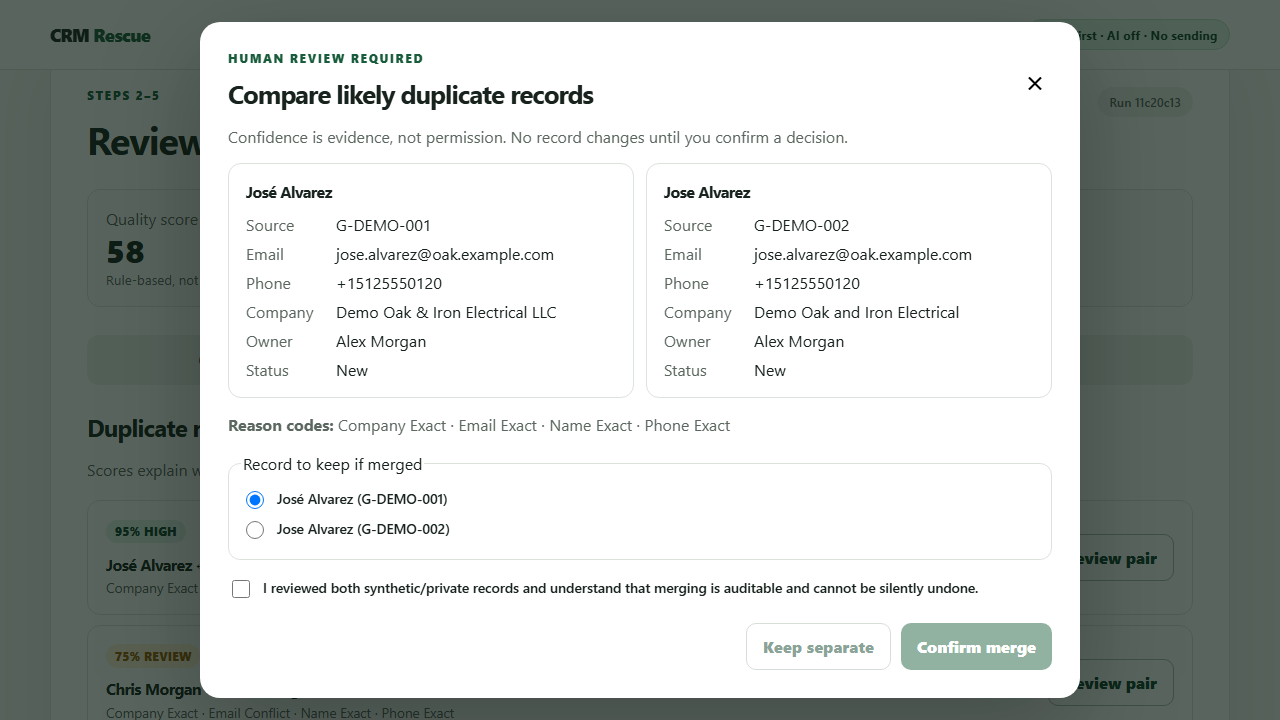
CRM Rescue walks an operator through import, column mapping, validation, and duplicate review. Every merge needs an explicit confirmation, every change lands in an audit trail, and the data never leaves the local machine.

From the demo: The repeatable demo takes 24 synthetic rows to 22 clean records, with all six duplicate candidates resolved by explicit human decisions.

Read the CRM Rescue case study
CRM Rescue — duplicate reviewsynthetic data
CRM Rescue duplicate review comparing two synthetic contact records side by side

How I work

Inspect → Automate → Verify

Select a stage to see what it covers. The goal is never maximum automation — it is the smallest reliable tool that makes the work easier to run.

What this stage produces

  • The workflow's real boundaries, written down
  • Failure states named before they surprise anyone
  • A clear owner for every decision

Two ways to work together

One painful workflow — or a seat on the team.

The same background carries both: understand the work firsthand, find where it breaks, and build the smallest tool that genuinely helps.

For businesses

Fix one painful process first.

Start with a single spreadsheet, CSV, browser, or copy-and-paste workflow. The Automation Fix Sprint is fixed-scope and low-commitment: you see a working result before deciding anything bigger.

See the Automation Fix Sprint

For employers

Add an operator-minded builder.

I am open to remote full-time and contract roles in Python automation, internal tools, technical operations, browser workflows, and data quality.

Discuss a role

Services

Automate the busywork. Keep the judgment.

Best for operational work that lives in spreadsheets, browser tabs, CSV exports, or repeated copy-and-paste.

01

Workflow Automation Assessment and Quick Win

Map one repetitive process, find the highest-value failure point, and deliver a working fix or an implementation-ready plan.

02

CRM/Data Cleanup and Operational Reporting

Turn inconsistent exports into validated, deduplicated data you can review — plus reports you can rerun.

03

Public-Data Monitoring or Browser Workflow Automation

Careful collection and browser-assisted workflows that keep sources traceable, permissions minimal, and approvals human.

How a project starts, what it costs, and where I draw lines

Get in touch

Bring me the process everyone works around.

One screenshot, a sanitized sample, or a short description is enough to start.